
DISCLAIMER: Read the left Column first before proceeding to the right.
First, I would like to thank Synology for sponsoring the DS920+ for the NAS CAD Review. Getting in touch with their support division was an easy task. Through all my questions and inquiries, the support team was super helpful and went out of their way to ensure their customer satisfaction.
In my search for a NAS system which can handle all the requirements for CAD usage I came across the DS920+. This NAS from Synology is quite impressive on paper as well as in real life.
Here are some key features which the manufacturer advertises:
- 2x 1GbE RJ45 supporting link aggregation.
- Accelerated Application Performance (Average 15% boost to computing-intensive applications)
- Reach Optimal Performance and Capacity with Dual M.2 2280 NVMe SSD Cache
- Expand Storage with Ease
- Empower Collaboration and Productivity
- Protect and Restore Data in a Snap
- Ready to Go Virtualized
- Safeguard Your Physical Assets with 24/7 Surveillance
- Scalability: Expand up to 9 drives with a DX517 expansion unit
For a more in-depth overview of the NAS’s capabilities check out this link.
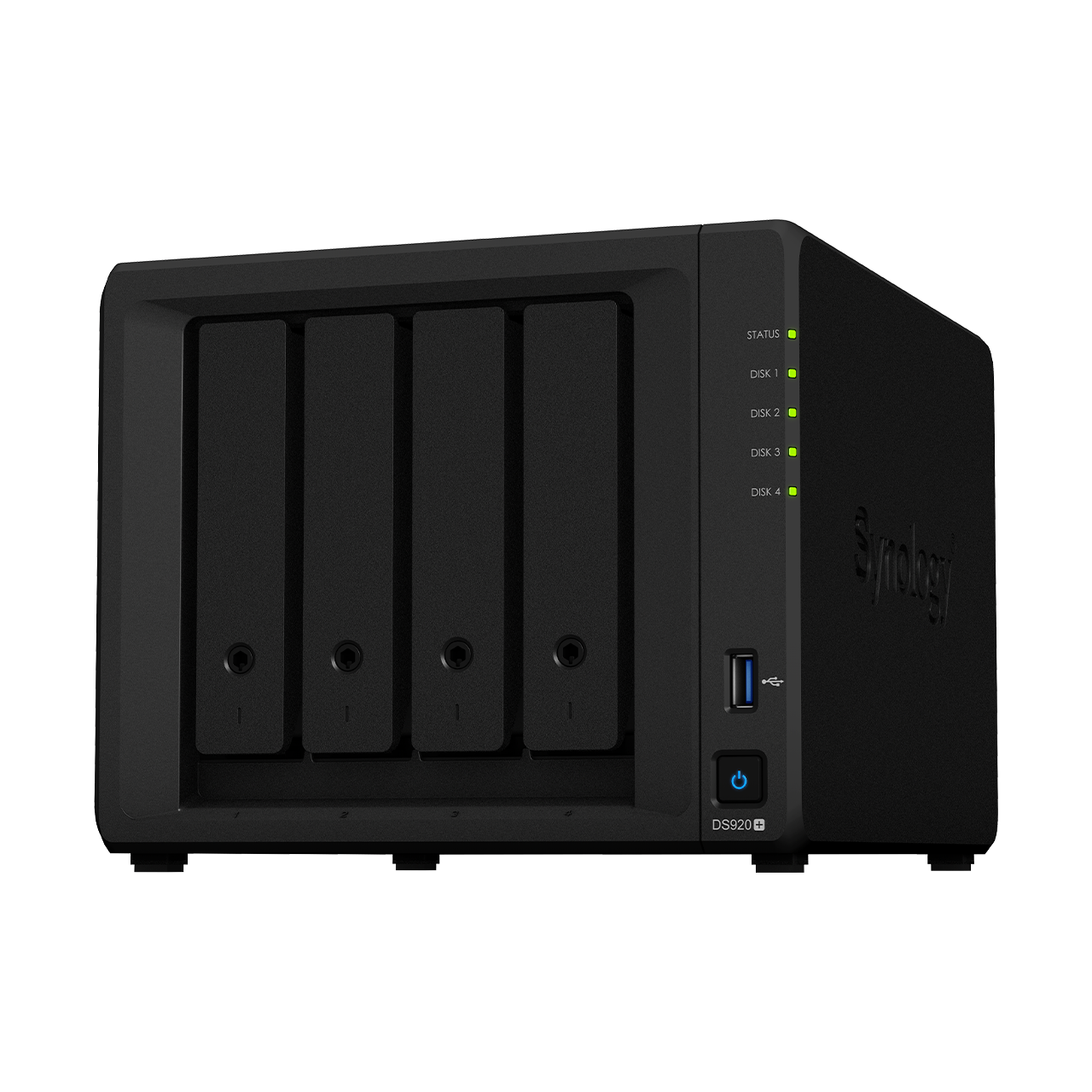
The DS920+ arrives in an eco-friendly box with minimal plastic waste; however, it is still well packaged as to avoid any damage to the NAS itself. With 166(H) x 199(W) x 223(D) mm and roughly 2.3 kg, this system is small and compact; fitting nicely into the office / home environment by taking up a minimal amount of desk / shelve space. The power supply is included as an external power supply and delivers around 100W at 100-240V AC 50/60HZ. Due to this and the support of many IEEE Standards, the NAS can be used globally without modification. All that is needed is an IEC 60320 C13 appliance connector to the corresponding country wall plug.
The NAS still has a premium feel, even though it is made mostly from plastic. The HDD trays are spring loaded capable of holding either 3.5” HDDs (no tools or screws required for installation) or 2.5” HDDs/SSDs (screws as well as screwdriver required for installation). With the storage installed, the tray slides smoothly into the locking position preventing disconnection or rattling.
The NAS works well without any noticeable break in the network bandwidth. On occasion the integrated fans spin up to cool the internal components. This can be reduced by avoiding warm surroundings such as direct sunlight. While cooling in automatic fan control mode, the fan emits a low hum, which in unison with the HDD noise becomes quite audible. This can, however, be managed with different modes of fan control as well as power consumption reduction to further lower the audible pitch.
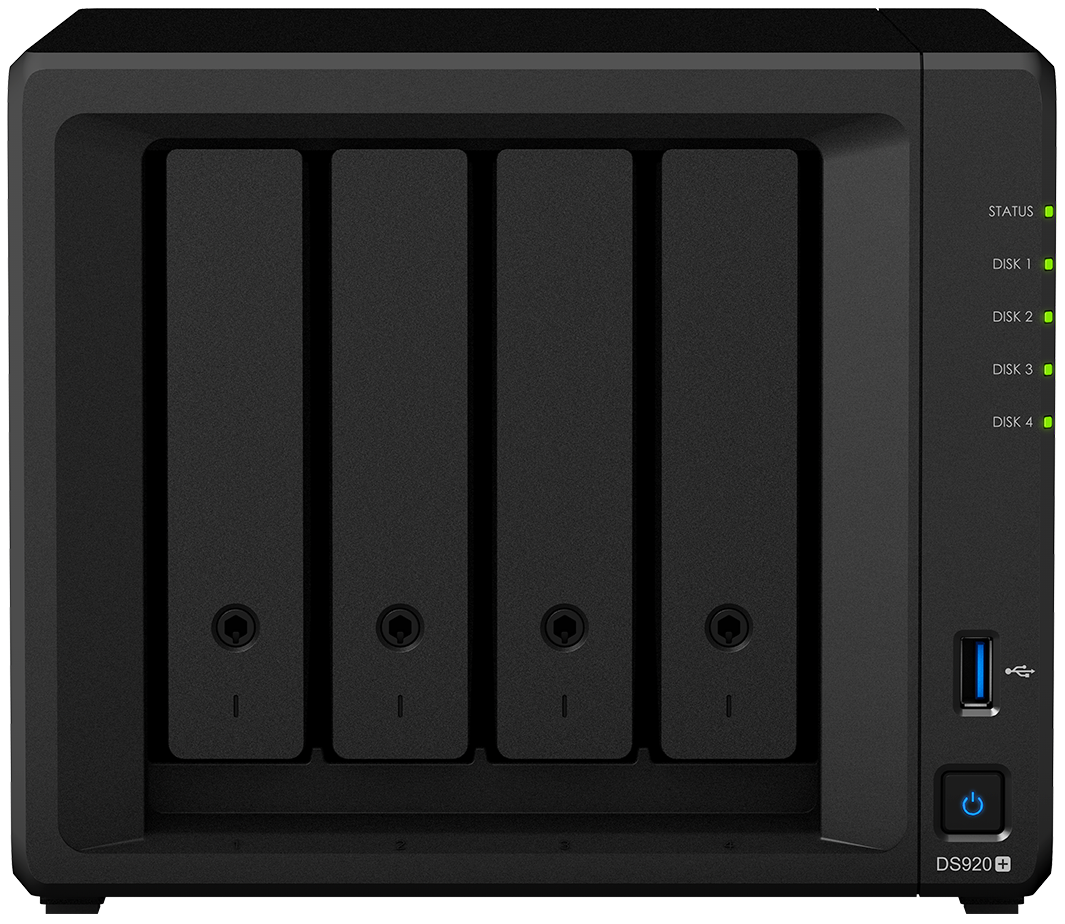
To indicate the status of each network port, the NAS includes two LEDs for each port as well as a power indicator (LED), and one LED for each of the HDD bays (4 bay system). With the LEDs in their ‘on’ state, the two LEDs next to each port (left and right) indicate the network state / configuration speed. The front power LED (green) indicates that the device is plugged in and turned on. Below this is the LED of each HDD (also green) which indicates the current operating state / health of each HDD.
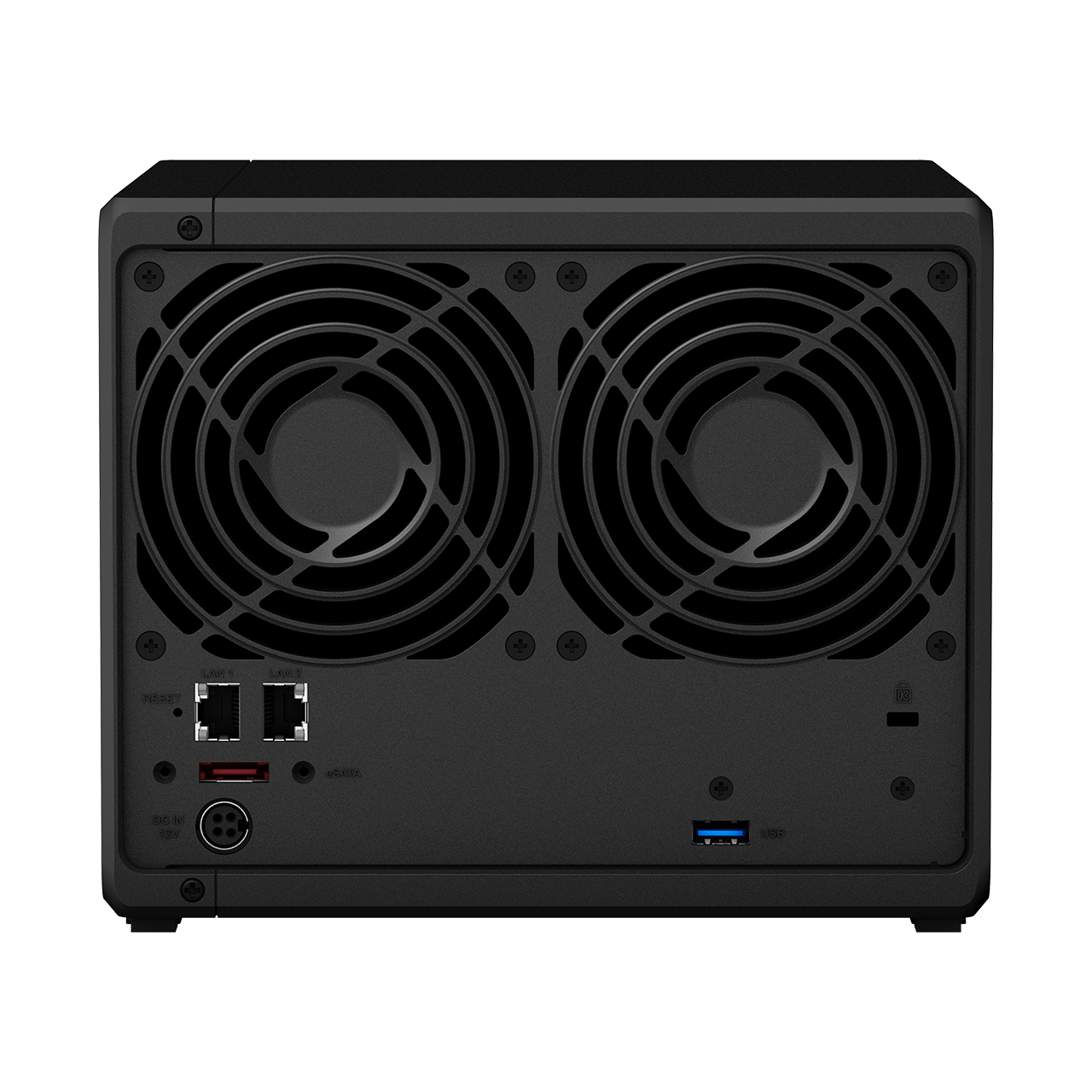
The DS920+ has 2x RJ45 1 GbE network ports, 2x USB 3.0 (one in back and one in front) as well as an eSATA port in the back through which the system storage can easily be expanded (up to 9x HDDs of a desired size and a maximum single volume size of 108TB). The NAS also has two large 92mm fans enabling adequate air flow / cooling for the hardware. Lastly, the system also has a reset button in the back in case you want to rest to the factory settings.
After a good bit of configuration and installation the DS920+ works like a charm. It is not as simple as plug and play with a not very intuitive initialization of the NAS which can either be done through a web GUI or APP. The web-based GUI (Graphis User Interface) for managing the NAS has a bit outdated look, but a very responsive design which delivers a good overview of the NAS’ capabilities. As such it takes a bit to find the specific setting you need, if this is your first time using DSM. This is only relevant for users with not as much experience with networking / NAS.
In the settings pretty much anything you would need can be configured; whether you want to manage when the fan spins up or at what speed it runs (if you are not happy with the automatic speed scaling based on hardware temperatures), control the power settings of your system, or to fully control when which LEDs of the system are turned on, this can all be done. The DSM software experience is great, so long as you have a bit of time to familiarize yourself with the layout, as well as where to find which settings. Synology is constantly working on improving their DSM, delivering two updates during the three months I spent testing their system (DSM 6.2.3-25426 Update 2 was tested).
The NAS was tested for different criteria as well as scenarios, most of which it managed very well. The tested scenarios include, but are not limited to the following:
- CAD usage in VM and from an ISCSI drive (conducted with Autodesk’s Inventor Professional ) – here the DS920+ struggled a bit with the CAD in VM
- Gaming from an ISCSI drive
- Network throughput speed test
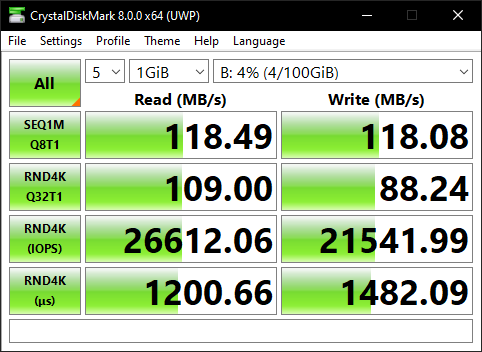
A transfer speed test was conducted with CrystalDiskMark which measured speeds of 118Mbit/s (write) and 118Mbit/s (read). This test was also done in a 5-loop setup with a 1Gb load.
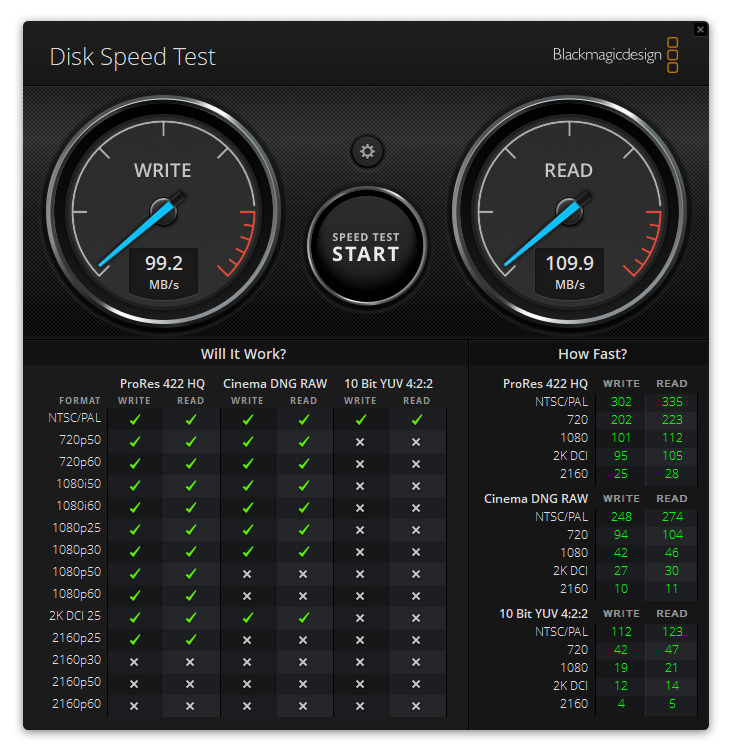
Using Blackmagicdesign Disk Speed Test software which is included in their Blackmagic Desktop Video available here for Windows, MAC OS X and Linux, I was able to reliably reach transfer speeds of 99Mbit/s (write) and 110Mbit/s (read) with a 1Gb stress load.
Each test was conducted connected to an ISCSI mounted with two RJ45 Cat 5e cables in link aggregation and two Seagate Ironwolf NAS HDDs configured in RAID 1. It is clear, that the HDD configuration is the limiting factor for increased speed throughput and not the adapter itself.
Overall, the Synology DS920+ NAS is a cost-effective, powerful solution for increasing your local / server storage capabilities in your home or work environment. It is very reliable and fairly easy to configure for your specific desired functionality. I am very happy with this device and can advise other home users or small businesses to purchase this NAS.
For a second opinion and a more in-depth general review of the NAS hardware and software please check out NASCompares.
Pros:
- Lock mechanism for HDD trays is very nice
- No tools needed for mounting HDDs / upgrading RAM / Cache
- eSATA for further Storage expansion
- 2x NVMe SSD Cache (easily accessible)
- Good CPU: Intel® Celeron™ CPU @ 2.00GHz
- RAM upgrade up to 8GB SO-DIMM DDR4
- Great number of installable APPS
- Basically limitless configuration possibilities with docker, VM, etc.
- Great APPs for control of NAS via mobile
Cons:
- Only 2GbE through link aggregation
- No external backup button (A variety of backup configurations are possible through software configuration)
- PCIe card upgrades are not possible (due to the SSD caching using the PCIe lanes)
- VM does not work reliably / fast
- Plastic case
Overall Rating:
Package Contents:
- DS920+ NAS
- AC Power Adapter
- AC Power Cable
- Quick Installation Guide
- 2x RJ45 LAN Cables
- Accessory Pack (with screw and Tray Key)
Suggested Improvements:
- Improve DSM software (especially the VM did not work so well) as well as RAID configuration GUI (gray out those not possible with detected hardware)
- When initializing the NAS auto connect and download the newest DSM from the Synology server instead of having to manually do so (that feels a bit outdated)
- DSM GUI looks a bit outdate (as opposed to high-definition pictures as background from other NAS manufacturers)
- Varying volume sizes and usage are displayed throughout the DSM (these should not contradict each other)
- Include a query list to install multiple APPS instead of having to wait till each APP is installed before being able to install a new one.
- Improve the quick connect HDD tray ergonomics (for bigger fingers the removal is a bit uncomfortable due to the shard plastic edges at the release point)